Partition organization
Since July 25, 2022, a new partition organization was introduced in EXPLOR. The new layout is shown below:
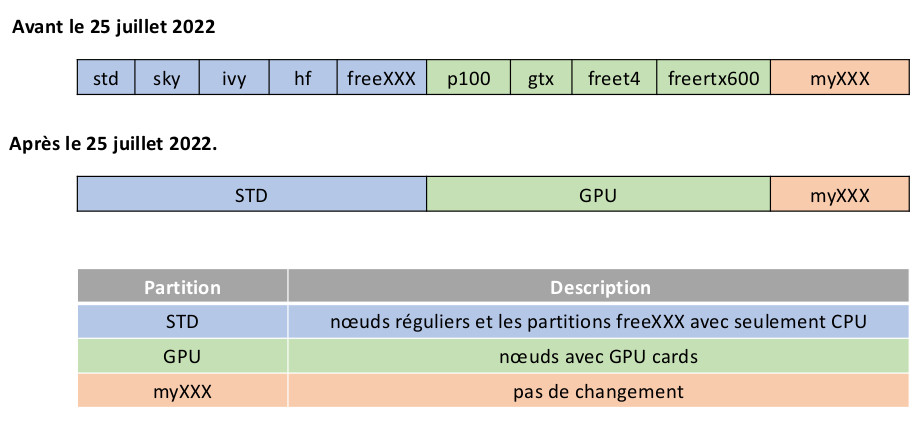
The general allocation in the std partition now includes nodes from the former freeXXX partition. If you do not select any special nodes, your JOB may be terminated due to the priority of JOBS on MyXXX nodes. To avoid this, consider selecting appropriate nodes while excluding private nodes. For instructions, please check items (4.3 and 5).
Association table
| Partition | Hostname | # nodes | # CPU /node | CPU memory (Mb) | Node memory (Gb) | FEATURE |
|---|---|---|---|---|---|---|
| debug | cna[01] | 1 | 64 | 2000 | 118 | BROADWELL,OPA,INTEL |
| std | cna[02...64] | 52 | 32 | 3750 | 118 | BROADWELL,OPA,INTEL |
| std | cnb[01...62] | 21 | 32 | 3750 | 118 | BROADWELL,OPA,INTEL |
| std | cnc[01...64] | 43 | 32 | 5625 | 182 | SKYLAKE,OPA,INTEL |
| std | cnd[01...12] | 11 | 16 | 3750 | 54 | IVY,IB,INTEL |
| std | cne[01...16] | 15 | 8 | 15000 | 118 | BROADWELL,INTEL,HF |
| std | cnf[01...08] | 4 | 8 | 12000 | 86 | SKYLAKE,OPA,INTEL,HF |
| std | cng[01...12] | 7 | 40 | 4500 | 182 | CASCADELAKE,OPA,INTEL |
| std | cnh[01...02] | 2 | 8 | 94000 | 758 | CASCADELAKE,OPA,INTEL,HF |
| std | cni[01...16] | 16 | 40 | 9000 | 354 | CASCADELAKE,IB,INTEL |
| std | cni[16...32] | 16 | 40 | 4500 | 182 | CASCADELAKE,IB,INTEL |
| std | cnj[01...64] | 64 | 48 | 5200 | 246 | EPYC3,IB,AMD |
| std | cnk[01...08] | 8 | 8 | 22500 | 182 | CASCADELAKE,IB,INTEL,HF |
| std | cnl[01...04] | 4 | 24 | 241 | 241 | EPYC4,IB,AMD |
| std | cnl[05...18] | 14 | 32 | 10000 | 500 | EPYC4,IB,AMD |
| gpu | gpb[01...06] | 6 | 32 | 3750 | 118 | BROADWELL,OPA,P1000,INTEL |
| gpu | gpc[01...04] | 4 | 32 | 2000 | 54 | BROADWELL,OPA,GTX1080TI,INTEL |
| gpu | gpd[01...03] | 3 | 24 | 3600 | 86 | CASCADELAKE,OPA,T4,INTEL |
| gpu | gpe[01...02] | 2 | 40 | 4500 | 182 | CASCADELAKE,IB,RTX6000,INTEL |
| gpu | gpf[01] | 1 | 32 | 3750 | 118 | CASCADELAKE,L40,INTEL |
| myXXX | --- | -- | -- | -- | -- | -- |
myXXX associations table
| Partition | Hostname | # nodes | #CPU | Memory (Gb) | Preemption |
|---|---|---|---|---|---|
| mysky | cnc[53,56-57,59-61] | 6 | 32 | 182 | Oui |
| myhf | cnf[02-04,06] | 4 | 8 | 86 | Oui |
| mycas | cng[01,04-05,07,09,11-12] | 7 | 40 | 182 | Oui |
| mylhf | cnh[01-02] | 2 | 8 | 758 | Oui |
| mylemta | cni[01-16] | 16 | 40 | 354 | Oui |
| mystdcas | cni[16-24,29-32] | 8 | 40 | 182 | Oui |
| mystdepyc | cnj[01-64] | 64 | 48 | 246 | Non |
| myhfcas | cnk[01-08] | 8 | 8 | 182 | Oui |
| mylpct | cnl[02-04] | 3 | 24 | 241 | Oui |
| mygeo | cnl[05-18] | 14 | 32 | 500 | Non |
| myt4 | gpd[01-03] | 3 | 24 | 86 | Oui |
| myrtx6000 | gpe[01-02] | 2 | 40 | 182 | Oui |
| mylpctgpu | gpf[01] | 1 | 32 | 118 | Oui |
The hostnames cnXX correspond to CPU nodes and gpXX to GPU nodes.
Submission instructions
(1) All submissions must always include
#SBATCH --account=MY_GROUP
or
#SBATCH -A MY_GROUP
(1.1) Special information – MyXXX submission with a different project association
To use a different project association when you have multiple projects, remove the option #SBATCH -A/--account from your script and add it externally on the command line:
sbatch --account MY_GROUP my_subm_scrit.slurm
or
sbatch -A MY_GROUP my_subm_scrit.slurm
MY_GROUP should be your project identifier; you can verify it in your terminal prompt:
[<user>@vm-<MY_GROUP> ~]
(2) General cases where you do not need a special machine
The general allocation in the std partition now includes nodes from the former freeXXX partition. If you do not select any special nodes, your JOB may be terminated due to the priority of JOBS on MyXXX nodes. To avoid this, consider selecting appropriate nodes while excluding private nodes. For instructions, please check item (4).
The private MyXXX partitions that are non-preemptible are: mystdepyc (cnj[01-64]) and mygeo (cnl[05-18]).
(2.1) any type of machine in std
#SBATCH --account=MY_GROUP
#SBATCH --partition=std
#SBATCH --job-name=Test
#SBATCH --nodes=1
#SBATCH --ntasks=4
or
#SBATCH -A MY_GROUP
#SBATCH -p std
#SBATCH -J Test
#SBATCH -N 1
#SBATCH -n 4
(2.2) any type of machine in gpu
#SBATCH --account=MY_GROUP
#SBATCH --partition=gpu
#SBATCH --job-name=Test
#SBATCH --nodes=1
#SBATCH --ntasks=1
#SBATCH --gres=gpu:2
or
#SBATCH -A MY_GROUP
#SBATCH -p gpu
#SBATCH -J Test
#SBATCH -N 1
#SBATCH -n 1
#SBATCH --gres=gpu:2
(3) Hosted hardware – continues as before
The mystdcasXXX partitions will now be accessible through a single mystdcas partition
(mystdcaslemta, mystdcasijl, mystdcascrm2) ==> mystdcas
#SBATCH --account=MY_GROUP
#SBATCH --partition=mycas
#SBATCH --job-name=Test
#SBATCH --nodes=1
#SBATCH --ntasks=4
or
#SBATCH -A MY_GROUP
#SBATCH -p mycas
#SBATCH -J Test
#SBATCH -N 1
#SBATCH -n 4
(4) Precise node selection
Selecting specific nodes is done via the FEATURES shown in the association table above. Examples:
#SBATCH --constraint=SOMETHING_FROM_FEATURES
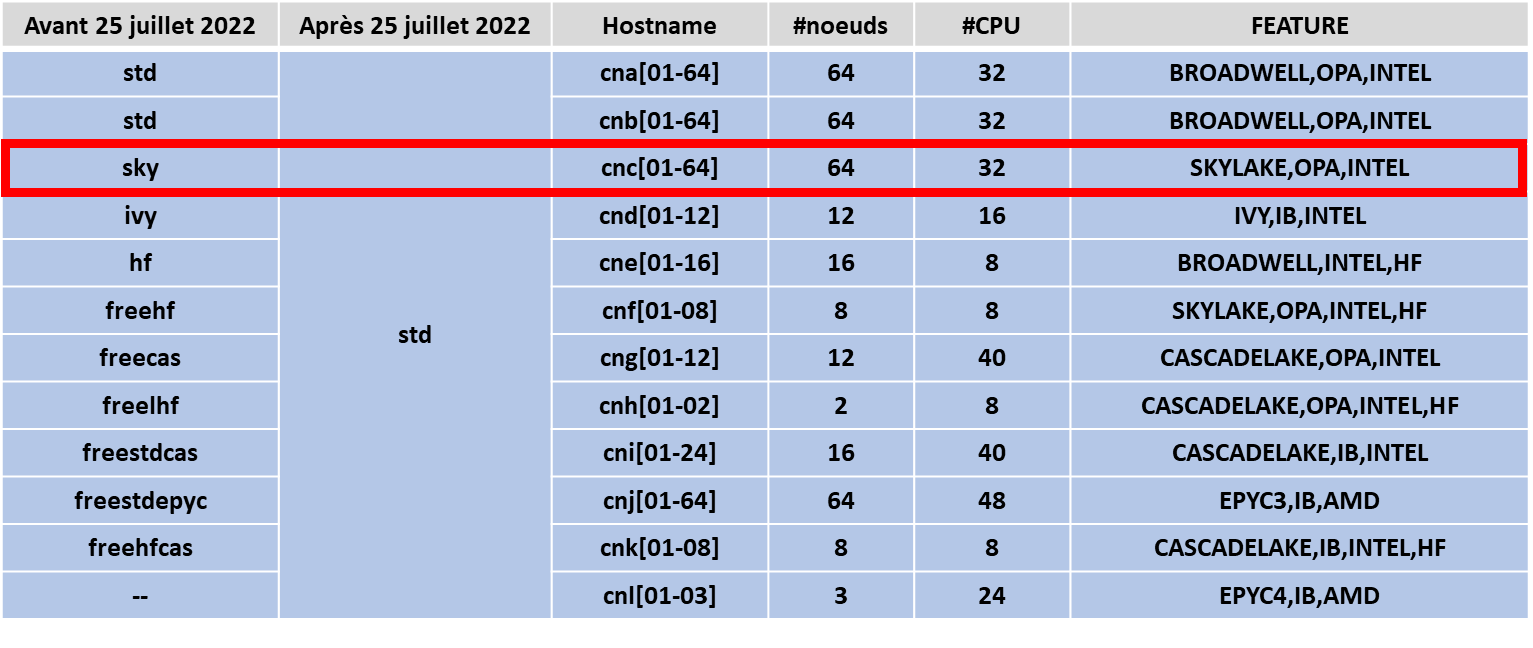
(4.1) Select nodes from the former sky partition
#SBATCH --account=MY_GROUP
#SBATCH --partition=std
#SBATCH --constraint=SKYLAKE,OPA,INTEL
#SBATCH --job-name=Test
#SBATCH --nodes=1
#SBATCH --ntasks=4
or
#SBATCH -A MY_GROUP
#SBATCH -p std
#SBATCH -C SKYLAKE,OPA,INTEL
#SBATCH -J Test
#SBATCH -N 1
#SBATCH -n 4
(4.2) Select nodes from the former p100 partition
#SBATCH --account=MY_GROUP
#SBATCH --partition=gpu
#SBATCH --constraint=BROADWELL,OPA,P100,INTEL
#SBATCH --job-name=Test
#SBATCH --nodes=1
#SBATCH --ntasks=1
#SBATCH --gres=gpu:2
or
#SBATCH -A MY_GROUP
#SBATCH -p gpu
#SBATCH -C BROADWELL,OPA,P100,INTEL
#SBATCH -J Test
#SBATCH -N 1
#SBATCH -n 1
#SBATCH --gres=gpu:2

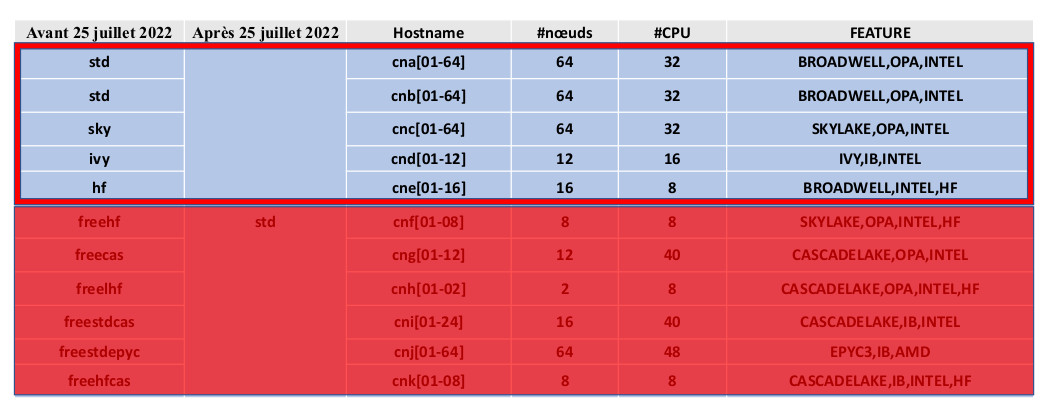
(4.3) Exclude all nodes from the former freeXXX/MyXXX machines and select all other legacy nodes (std, sky, ivy, hf)
#SBATCH --account=MY_GROUP
#SBATCH --partition=std
#SBATCH --constraint=NOPREEMPT
#SBATCH --job-name=Test
#SBATCH --nodes=1
#SBATCH --ntasks=4
or
#SBATCH -A MY_GROUP
#SBATCH -p std
#SBATCH -C NOPREEMPT
#SBATCH -J Test
#SBATCH -N 1
#SBATCH -n 4
(5) Restart/Requeue preempted JOBS
This is not a feature for JOBS that end with an error. It is a feature for JOBS that may have been removed from execution by the preemption rule. If you want to submit to all machines in the STD partition—even if on some machines your JOB may be preempted to give priority to a higher-priority job—you can use the job requeue feature (--requeue):
#SBATCH --account=MY_GROUP
#SBATCH --partition=std
#SBATCH --requeue
#SBATCH --job-name=Test
#SBATCH --nodes=1
#SBATCH --ntasks=4